Plan First, Then Change — Plan Mode for AI Agents in Game Development
Use plan mode, clarifying questions, a message queue and code-review cards in AI Game Developer to stay in control of an AI agent on large game tasks.
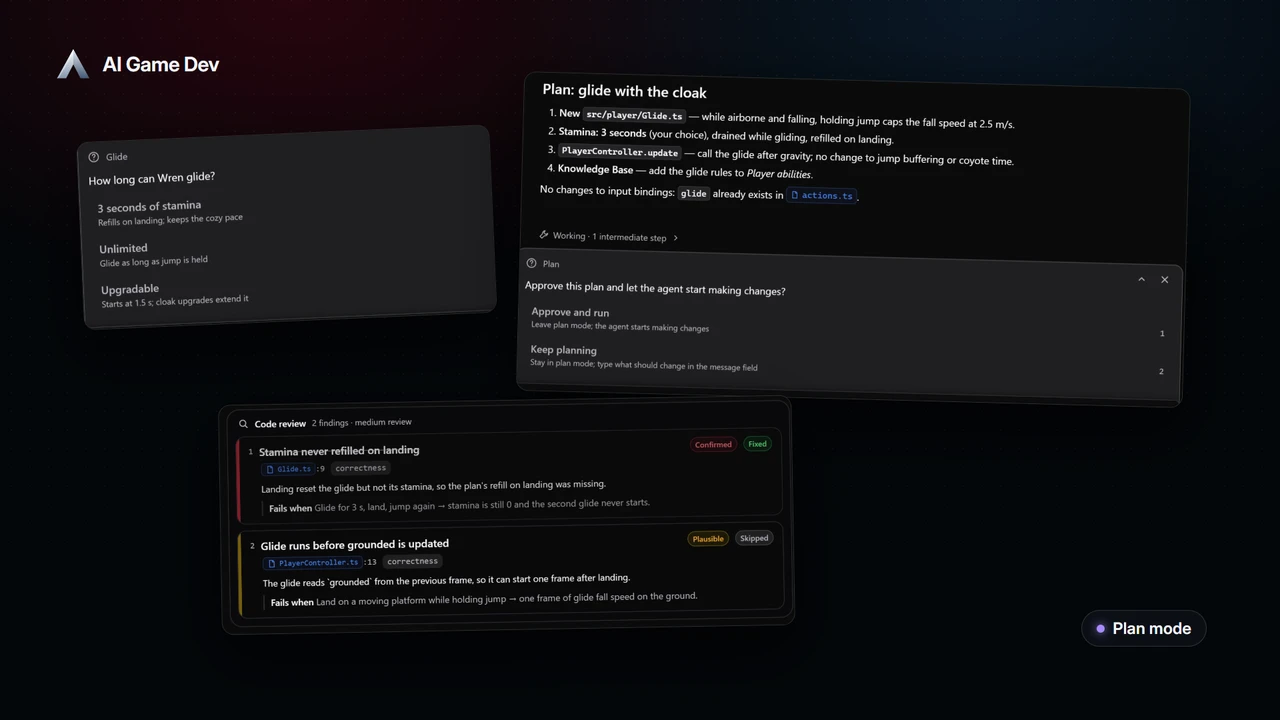
An AI agent is fast, and that is exactly why a big task can go wrong quickly: it starts editing code before you agree on what it should do. Plan mode in AI Game Developer turns that around. The agent reads your project and writes a plan, every change is refused until you approve it, and only then does it start work.
Together with clarifying questions, a message queue and code-review finding cards, plan mode gives you a simple way to steer an AI agent through a larger game development task. In this post we use all of them on one session from our demo game, Skyward Keep: adding a glide to the player character. The video is a real recording of the app: the agent's replies are scripted for the demo, and every tool call in it ran for real.
Why Plan Before the Agent Edits
Small requests, such as "make the jump higher", do not need a plan. Larger ones do. A new movement ability touches the player controller, the input, the tuning values, the documentation and often the audio. If the agent guesses wrong about one of those, you end up undoing changes across many files.
A plan solves three problems at once:
- You see the scope before anything changes: which files, which systems, in which order.
- Misunderstandings come out early, while they cost a sentence to fix.
- The approved plan becomes the checklist you use to review the result.
Step 1: Switch On Plan Mode
Plan mode is a per-session switch in the composer. Turn it on before you send the task. In plan mode the agent can read files, search the project and its notes, but every change is refused until it presents a plan.
Then describe the goal, not the steps. The demo request is short:
"Add a glide: hold jump in the air to glide with Wren's cloak."
The agent starts by reading the player controller and the project's notes on player abilities.
Step 2: Answer the Agent's Questions
A good plan needs a few decisions only you can make. The agent can ask you a question with choices, and it slides out above the input. In the demo it asks one design question before writing the plan, "How long can Wren glide?", with three options:
- 3 seconds of stamina, refilled on landing, which keeps the cozy pace.
- Unlimited, as long as jump is held.
- Upgradable, starting at 1.5 seconds and extended by cloak upgrades.
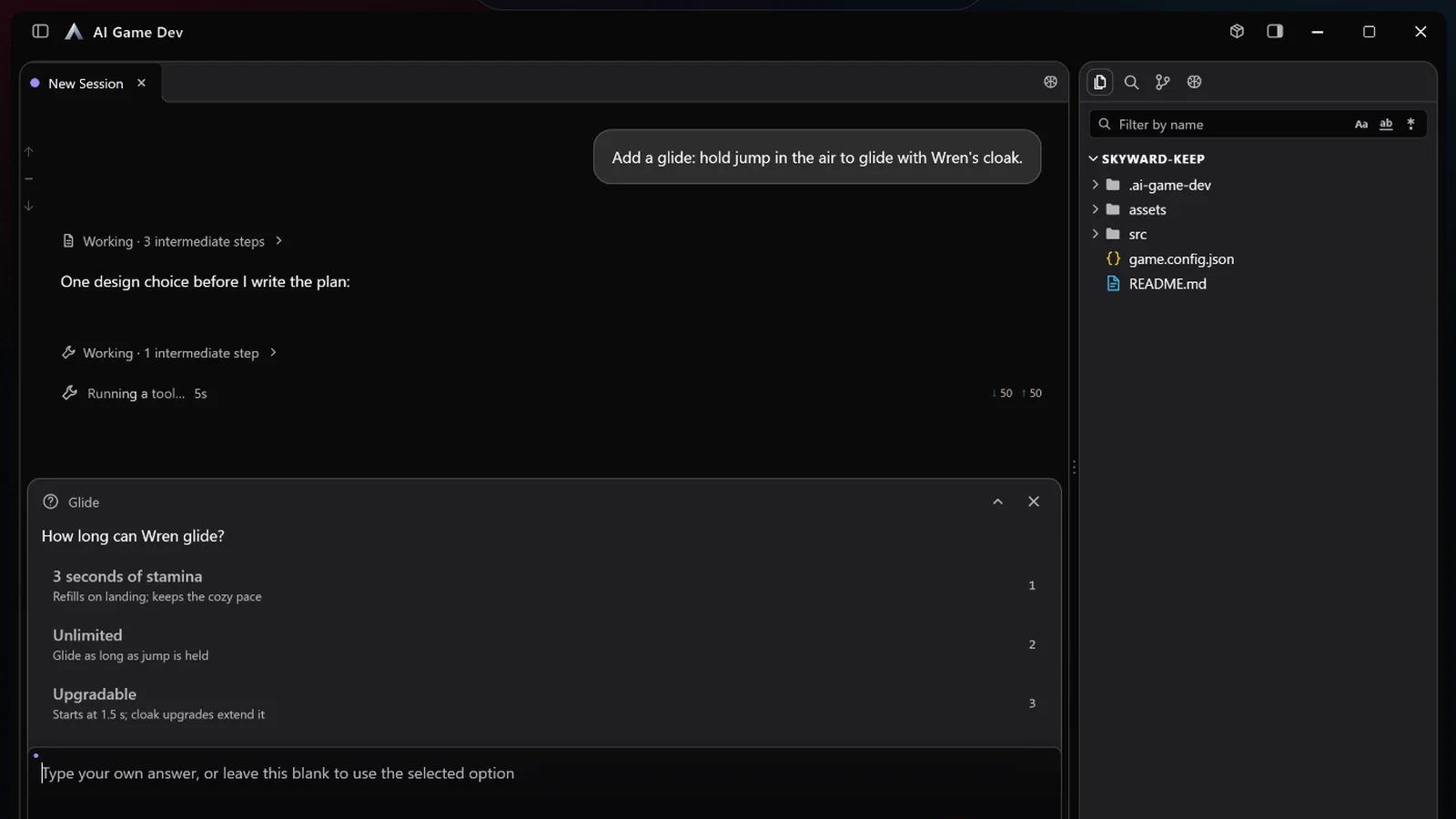
When the agent has several questions, they become an editable survey: you can click any question to revisit it, change an earlier answer or skip ahead, and the answers are sent only when every question has one. Answering takes a minute and saves a round of rework later. If your project has a Knowledge Base, the agent reads the conventions you already decided there and asks fewer questions.
Step 3: Review the Plan
The agent presents the plan with an approval card that offers two choices: Approve and run, or Keep planning. The demo plan has four items:
- A new Glide script: while airborne and falling, holding jump caps the fall speed at 2.5 m/s.
- Stamina of 3 seconds, the answer to the question, drained while gliding and refilled on landing.
- The player controller calls the glide after gravity, with no change to jump buffering or coyote time.
- The glide rules are added to the Player abilities note in the Knowledge Base.
It also notes that the input bindings need no change, because a glide action already exists.
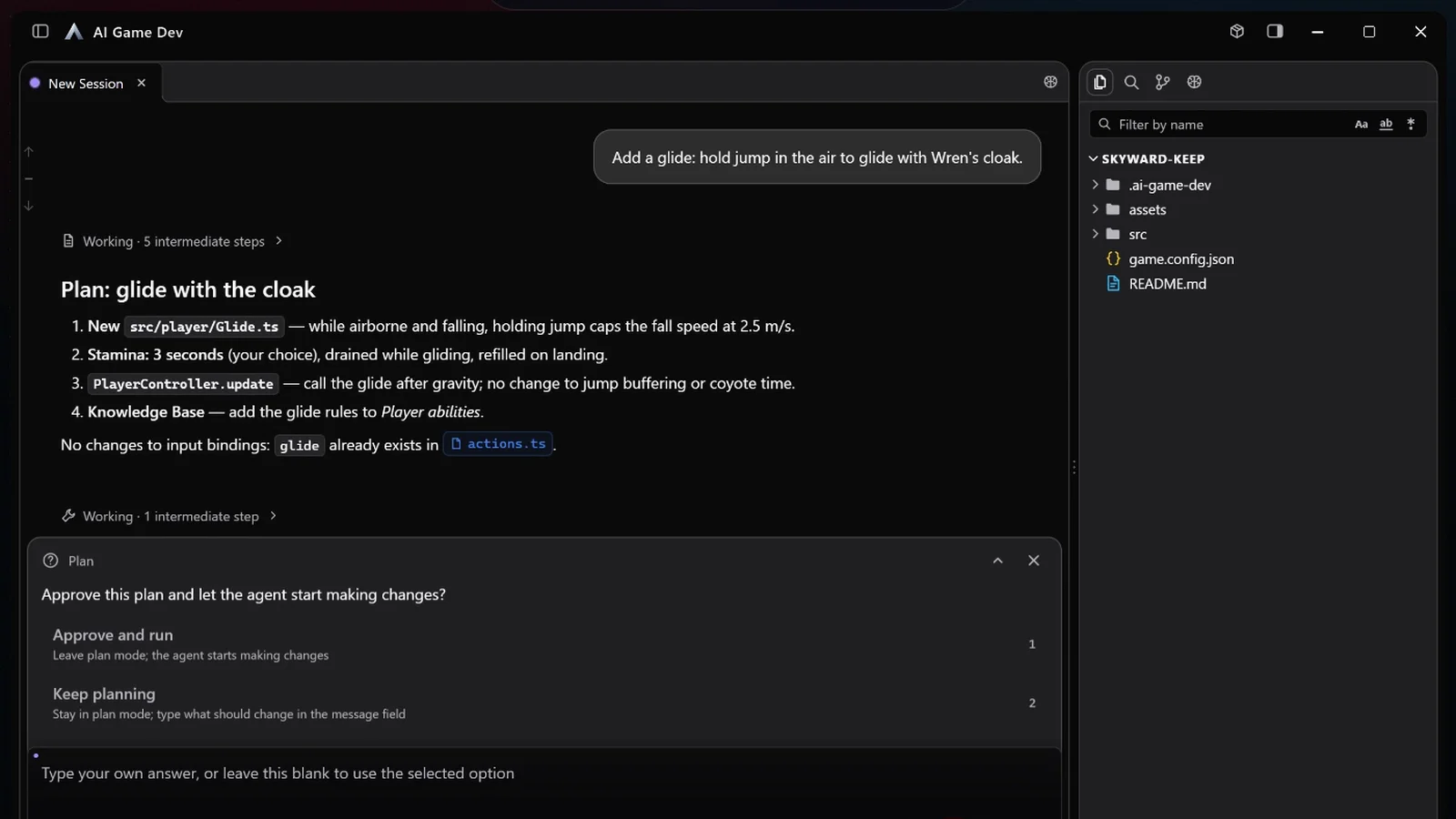
Read the plan the way you would read a teammate's design note. Does it touch only the files it should? Is the order sensible? Is anything missing? If something is off, choose Keep planning and type what should change; the agent revises the plan and shows it again. When it is right, approve it and the agent starts work.
Step 4: Queue Messages While It Works
While the agent is working, you will think of things. You no longer have to wait or interrupt. In the demo, while the glide is being implemented, a follow-up is typed and queued:
"Also play a soft whoosh when the glide starts."
Messages sent during a running turn wait in a queued drawer above the composer. You can send one immediately, or pull it back into the composer to edit it. If you press Stop, the running turn is cancelled and your queued text returns to the composer, so a message you withdrew can never still run. The agent finishes the approved plan first and then takes the queued request.
Tool permission requests appear in the same drawer, and the session shows a waiting-on-you mark while a prompt is open, so you can see at a glance which sessions need you.
Step 5: Check the Result with Code-Review Cards
Before handing the work over, the agent reviews its own change. Code-review results appear as finding cards, each with a verdict, the file and line, a category, a short summary and a failure scenario that explains how the problem would show up in the game. When nothing is found, the card says so clearly.
In the demo, the review cards show two findings:
- Confirmed and fixed: stamina was never refilled on landing. Glide for 3 seconds, land, jump again, and the second glide never starts.
- Plausible and left for you to decide: the glide reads the grounded state from the previous frame, so landing on a moving platform while holding jump could give one frame of glide speed on the ground.
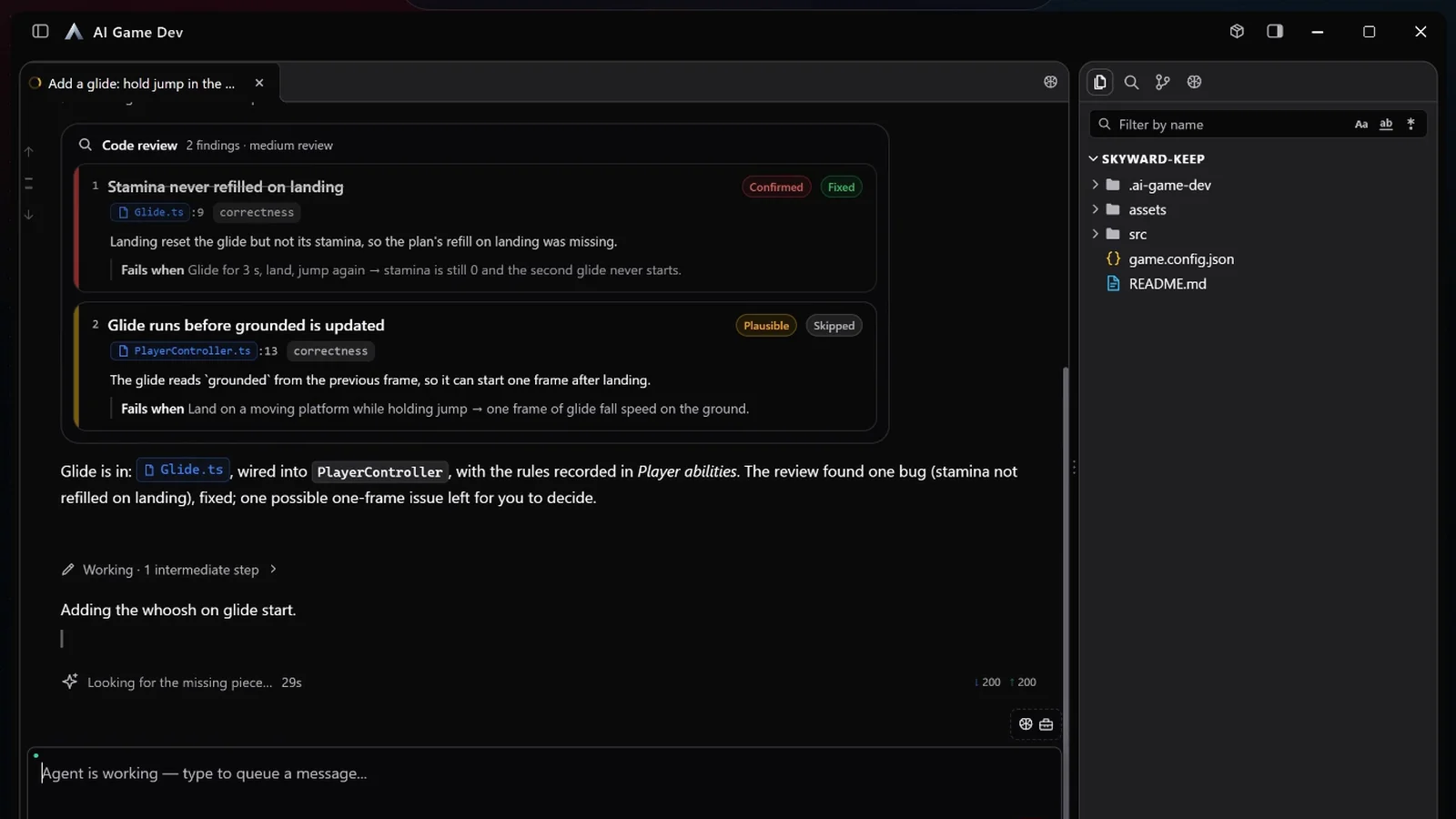
Treat the cards as a to-do list: ask the agent to fix the findings you agree with, and say why you skip the others. Then check the approved plan item by item and play the game. A glide that is correct in code can still feel wrong in play.
Keep Long Sessions Healthy
Large tasks fill the agent's context. When a long session is about to take on an unrelated new task, the composer offers to start fresh, which saves your limit. The offer appears only when the agent is idle and the context is large, and you can always keep working in the current session instead. A good rhythm is one session per feature: plan, build, review, then start the next feature in a fresh session.
A Workflow You Can Reuse
For any task that touches more than a couple of files:
- Turn on plan mode and describe the goal.
- Answer the agent's questions.
- Review the plan and keep planning until it is right.
- Approve, and queue follow-up thoughts instead of interrupting.
- Review the changes with finding cards, then playtest.
Plan mode and agent questions arrived in release 0.25.0, and the message queue and finding cards in 0.25.8 (https://ai-game.dev/releases/0.25.8). The best practices for each engine at ai-game.dev/docs/best-practices go further on how to size tasks for an AI agent. Download the app at ai-game.dev/download and try plan mode on your next feature.